What this form asks
4 questions over 3 pages, 4 of them required. Some questions appear only after an answer that needs them.
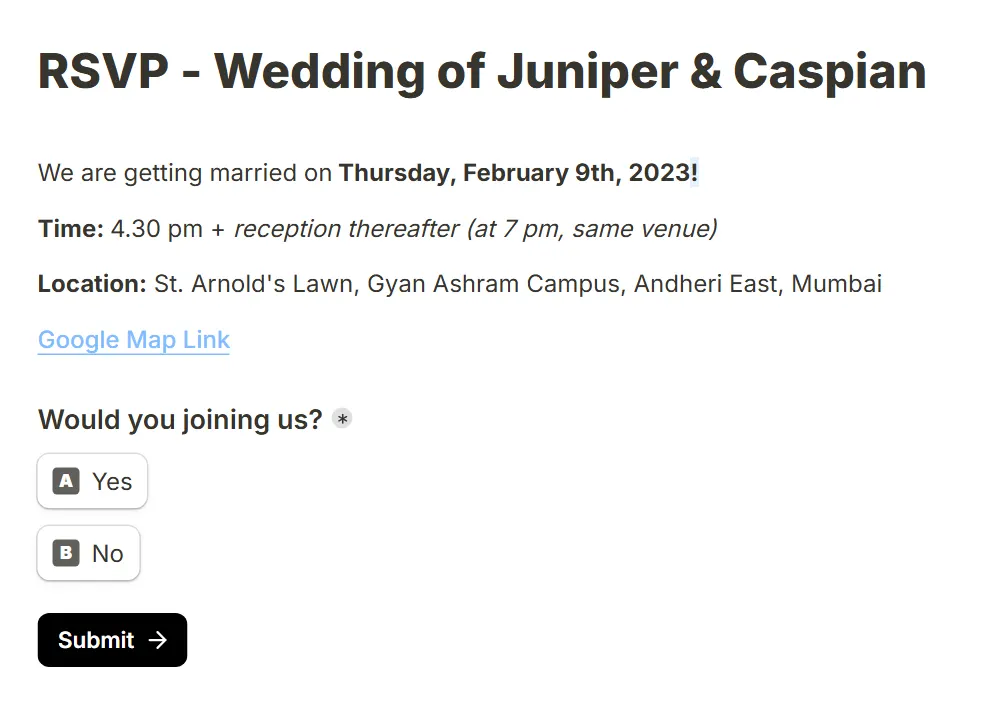
- Would you joining us?Single choice · required
- Tell us how many peopleNumber · required
- Your nameShort answer · required
- Please confirm your mobile number:Phone number · required
This wedding RSVP form asks each guest whether they will be joining you, how many people are in their party, their name and a mobile number to reach them on the day. It runs over three short pages, and logic lets a guest who is not coming skip the questions that only matter to those who are.
What the form covers
The guest answers whether they will join you, how many people are coming, their name, and confirms their mobile number. All four are required, so every reply gives you a name, a number of seats and a way to reach the guest.
Who uses a wedding RSVP form
- Couples collecting replies from a wedding website or a printed invitation with a link or QR code.
- Wedding planners tracking replies for several weddings.
- Families organising an engagement party or a rehearsal dinner.
How to use this template
- Use the template. Click "Use this template" to copy the form into your workspace.
- Add your day. Put your names, the date and the venue in the opening text, and add questions for meal choices or dietary needs if you are serving a set menu.
- Share it. Publish the form and send the link with your invitation, or embed it on your wedding website.
Frequently asked questions
Can guests choose a meal?
Yes. Add a single choice question for the menu, and use conditional logic to ask it only of guests who are coming.
How do I get the final headcount?
Every reply is in the Submissions tab, where you can download them as a CSV file to add up the party sizes.
Can I put the form on my wedding website?
Yes. Embed the form on your wedding site, or link to it.